Counted
Equipment and devices, by the tag printed beside each one. Repeated floors and units are counted once on the enlarged plan, then multiplied by how many there are.
Quantity takeoff
Pick your trades. We count and measure them from your drawings and mark every counted symbol on the sheet, so you can check each quantity before you price the job.
What you get
The Takeoff tab lists each item with its quantity in EA, LF or SF and a confidence level. Search the list, open any item, or export it as a PDF report or CSV.
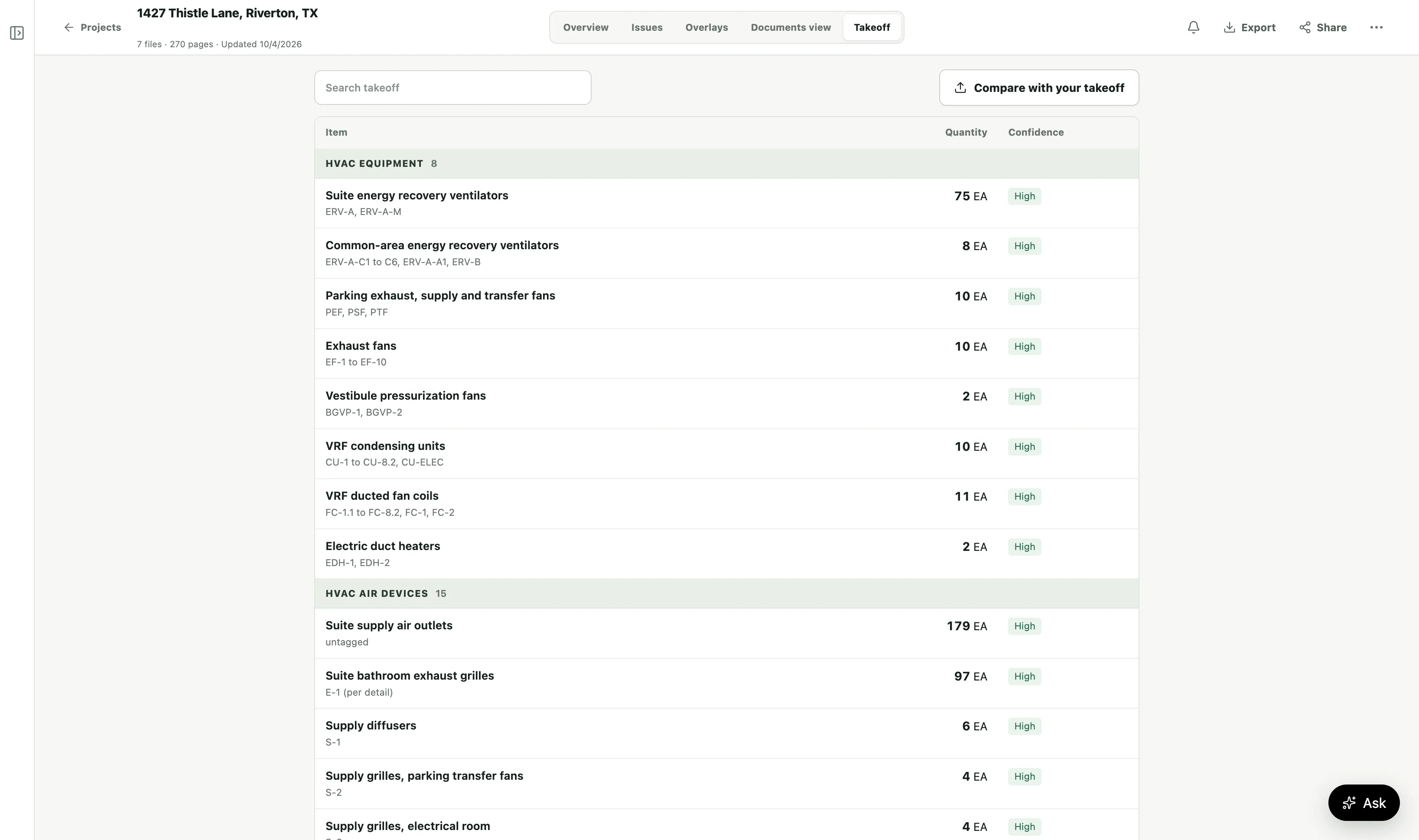
Check every count
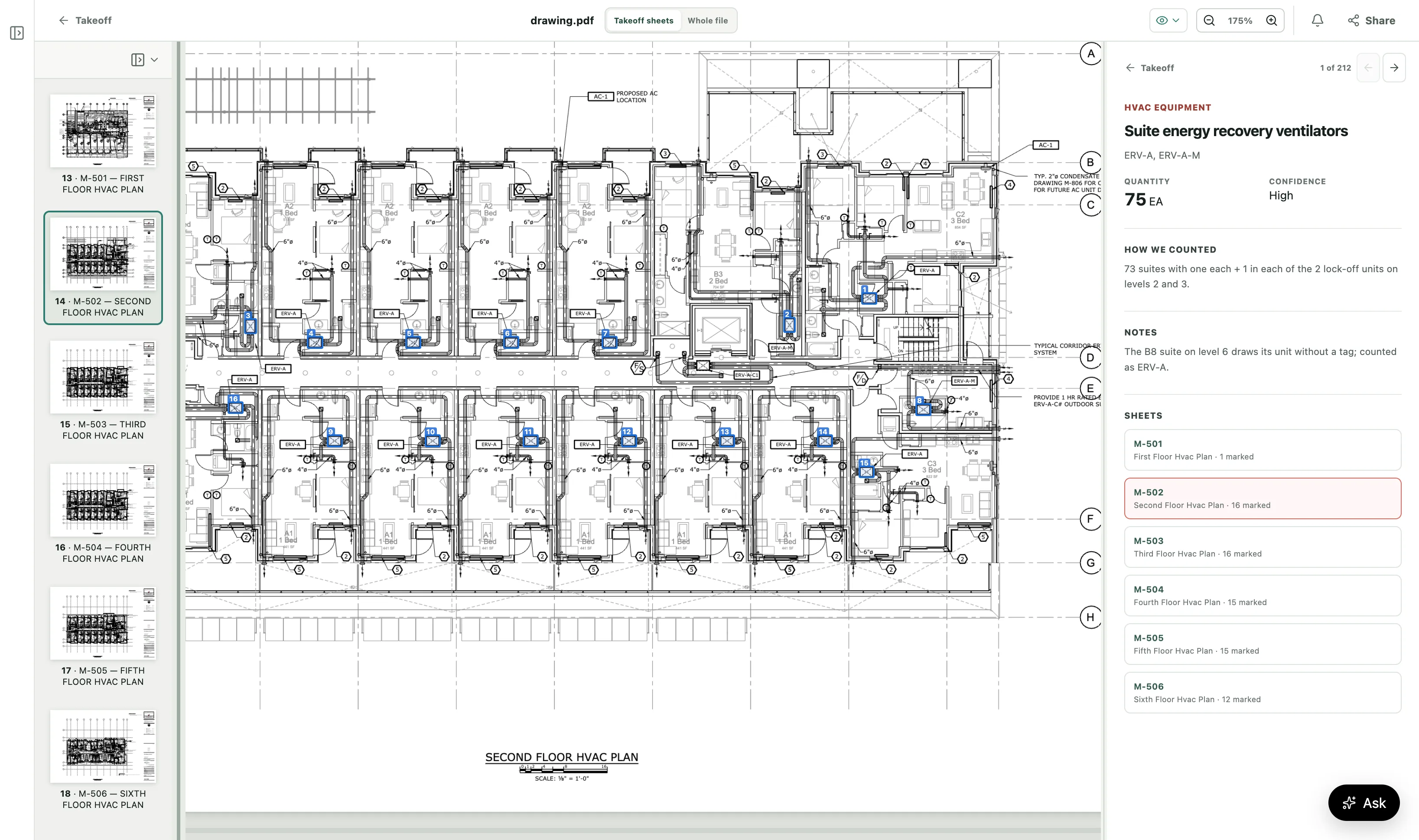
Open an item to see its drawing sheets, with a numbered box on every symbol we counted. Beside the drawing, How we counted shows the arithmetic, and the notes show where the drawings disagree with themselves.
How we count
Each item shows how we got its number, so you can follow it on the drawing.
Equipment and devices, by the tag printed beside each one. Repeated floors and units are counted once on the enlarged plan, then multiplied by how many there are.
Pipe and duct, by length at the printed scale. Lengths are net, with no waste added, so you add your own.
A count times the quantity per unit that a detail gives. How we counted shows the arithmetic, for example “8 per typical floor × 5 floors + 2 on the roof”.
Every count is done twice, independently. Where the two counts differ, we settle it on the drawing before we deliver the takeoff.
Where the drawings don’t give a fact, such as a rod length, we say what is missing instead of guessing.
How to order
When you set up a project, choose Takeoff, Plan review, or both under “I need”.
We count and measure only the trades you pick. Add a note for anything else we should know. We remember your trades and notes for your next project.
Your takeoff appears on the project’s Takeoff tab. Export it as a PDF report or CSV.
Trades
Pick one trade or several. For anything else, choose Other and tell us in the notes.
Mechanical (HVAC), plumbing, electrical, fire protection, and low voltage.
Concrete, masonry, structural steel, framing and carpentry, roofing, and windows and glazing.
Doors and hardware, drywall and ceilings, flooring, painting, sitework and utilities, and landscaping.
Who it is for
For general contractors, subcontractors and suppliers pricing a job in the bidding phase. Put our quantities next to yours, check the items that differ on the drawing, then add your own waste and prices.
Want the drawings checked too? Add a pre-bid review to the same project to find conflicts and missing information before you price.
Questions, answered
Mechanical (HVAC), plumbing, electrical, fire protection, low voltage, concrete, masonry, structural steel, framing and carpentry, roofing, doors and hardware, windows and glazing, drywall and ceilings, flooring, painting, sitework and utilities, and landscaping. For anything else, choose Other and tell us in the notes.
Open an item. Its drawing sheets show a numbered box on every symbol we counted, and How we counted shows the arithmetic. The notes show where the drawings disagree with themselves.
No. Pipe and duct are measured at the printed scale, and lengths are net. Add your own waste.
We say what is missing instead of guessing. For example, if no sheet gives the length of the hanger rods, we give the number of rods and note that the length is not shown.
Yes. On the Takeoff tab, select Compare with your takeoff and upload yours in any file type. We add your numbers beside ours for each item, with the difference.
Yes. When you set up a project, choose Takeoff, Plan review, or both under “I need”.
Upload the drawings, pick your trades, and check every count on the sheet.
Get a second takeoff before you price the job
Trusted by hundreds of professionals