Fixed
The revised evidence shows that an earlier issue has been addressed. Its original finding and references remain available.
Recheck
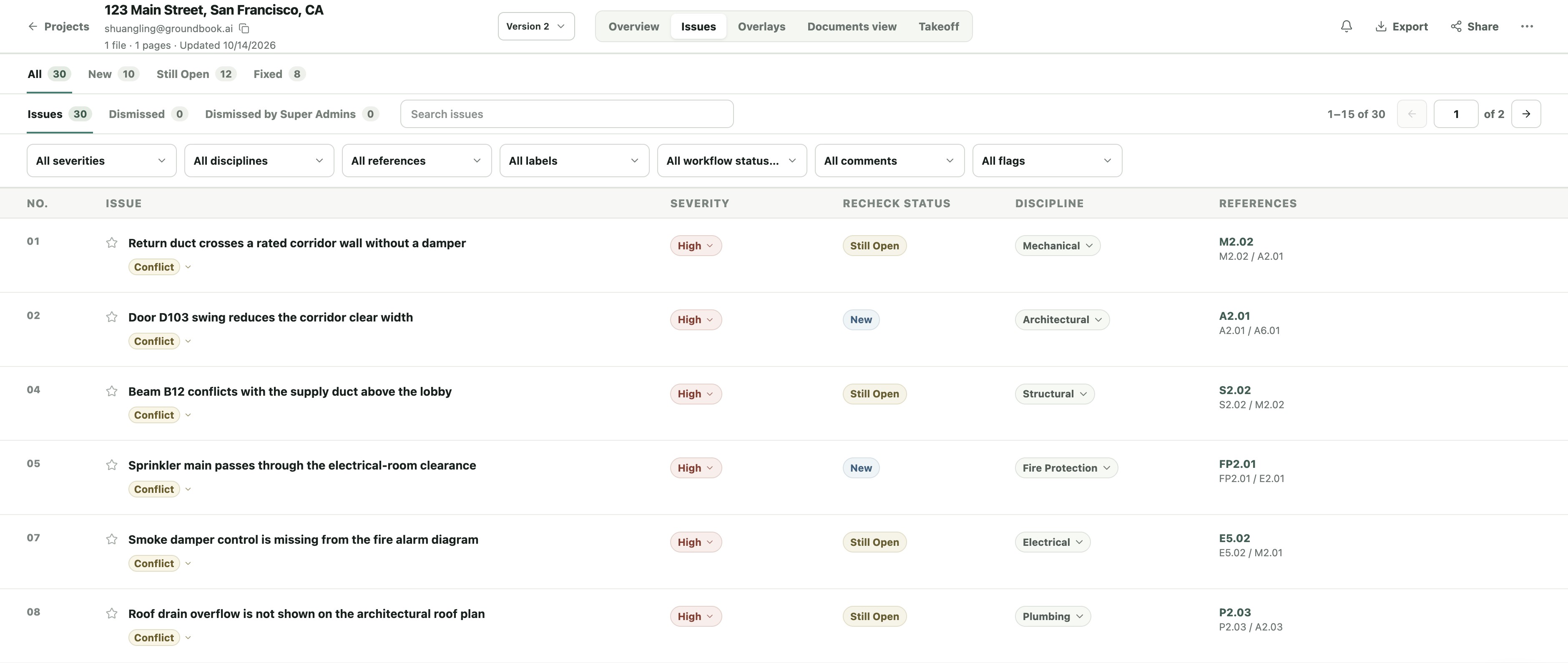
Upload revised drawings and reuse the files that have not changed. We check whether earlier comments were addressed and show what is Fixed, Still Open or New, with every review version saved.
Inside the app
Filter by New, Still Open or Fixed. A fixed finding keeps its earlier text and references, so you can open the original evidence instead of losing the review history.
How it works
Open a completed plan review and select Recheck. Tell us whether you want to check previous comments, review scope or design changes, or check something else.
Upload the revised documents. Bring forward the unchanged files you still need from the earlier version; the review scope and instructions carry over for you to review.
Open the new version’s issues. See which earlier findings remain, which are fixed, and which findings are new. Switch versions to return to any earlier review.
Three issue statuses
The revised evidence shows that an earlier issue has been addressed. Its original finding and references remain available.
An earlier issue is still present in the revised documents. See the current finding and supporting evidence.
A finding appears in the latest review that was not matched to an earlier issue. Review it alongside the remaining comments.
Questions, answered
No. Select the unchanged files you want to reuse from the earlier version, then upload the revised files for the new review.
Yes. Each check is saved as its own version. Use the version picker to open earlier drawings, findings and references.
Yes. Choose project scope or design changes as the reason, then review the carried-over instructions and update the files and scope for the new version.
The comparison remains unresolved while the evidence is checked. An unconfirmed fix is not counted as Fixed.
Yes. The new version follows the normal upload, scope and payment flow. The exact price is shown before payment.
Keep exploring
Check submitted drawings and product data against the contract documents.
Explore the featureStart with an address, edit the outlines, and export a scaled drawing.
Explore the featureLine up two drawings to compare revisions or coordinate disciplines.
Explore Smart OverlayOpen a completed project and start a recheck of the revised documents.
Check the revision before it goes out
Trusted by hundreds of professionals