Shop drawings · Product data · Submittals

AI review of shop drawings and submittals

A shop drawing answers one question: does the fabricator or supplier’s interpretation match the contract documents it was prepared from? Groundbook compares the submittal against the contract set, the specification section, and the other trades it has to fit, and returns each difference with both references linked.

Inside Groundbook

From submittal to findings

  1. Upload the submittal with the contract set

    Add the shop drawings, product data, or samples-in-PDF alongside the contract drawings, the specification section, and any related trades’ documents they have to agree with. Mark which files are the submittal and which are references, and note the transmittal or issue the submittal claims to be based on. Import from Autodesk Construction Cloud (Forma), SharePoint, Google Drive, Box, Dropbox, Bluebeam Studio, or email.

  2. Groundbook compares scope, dimensions, and interfaces

    The submittal is checked against the contract requirement it is supposed to satisfy: sizes, marks, materials, performance criteria, and connections against the structural and architectural drawings and the specification section, then against the adjacent trades’ documents for openings, supports, clearances, and rough-in.

  3. Verify findings, then route the response

    Each finding names the difference and shows both sources highlighted, so the reviewer decides what it means before responding. The engineer or architect of record still performs the submittal review for conformance with the design concept; Groundbook prepares that decision rather than replacing it.

A finding, with its sources

See both sides of the comparison

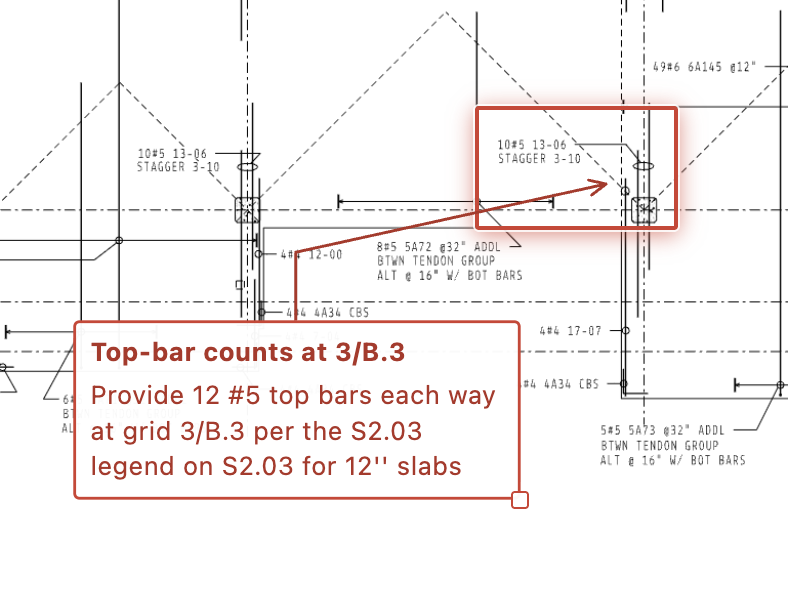
This hotel finding connected a door on the plan with its schedule row and the separation requirement that governed it. A submittal review works the same way: compare the shop drawing against the contract requirement and the trades around it. Open the image to inspect the evidence view.

A hotel door-rating finding beside its highlighted plan and linked drawing and code references in Groundbook.
A door-rating finding from the hotel review, shown beside its drawing and supporting references.Review a submittal like this

What a shop drawing review compares

Six things checked before fabrication or ordering

A shop drawing review is a set of comparisons, each running from what the supplier proposes back to what the contract requires. This is what Groundbook checks, and what the reviewer confirms.

What gets compared on a shop drawing or submittal review, against what, and what the reviewer confirms.
What is comparedAgainstWhat the reviewer confirms
Contract basisStructural, architectural, and MEP drawings; the specification section; the transmittal or addendum the submittal claims to follow.Confirm the submittal was prepared from the current contract issue, not a superseded one. A shop drawing built on an old revision is a finding on its own.
Scope and quantitiesThe submittal schedule or index against the specification’s submittal requirements and the drawing’s scope of work.Check that every required item was submitted and that none was substituted without a request. A missing submittal reads as an open item, not a pass.
Dimensions and marksMember marks, sizes, and locations against the contract drawings and the schedules that reference them.Every mark should resolve to one drawing location and one schedule row, with consistent sizes and quantities across all three.
Performance and materialsStated performance criteria, ratings, and material or finish data against the specification section and any delegated-design criteria.Where the specification gives a performance value and the submittal gives a product, confirm the product’s published data actually meets that value.
Connections, embeds, and interfacesConnection design basis, embeds, and anchor points against the structural drawings and the trades that provide the receiving condition.An embed shown on one discipline’s documents and missing from another is exactly the kind of gap a shop drawing review exists to catch.
Deviations and substitutionsNotes, cover letters, and redlines the supplier adds to the submittal.A stated deviation still needs a decision from the responsible designer. Groundbook flags it; it does not approve or reject it.

From published project reviews

The kind of gap a submittal review catches

These anonymized findings come from published Groundbook reviews of construction drawing sets. The same comparisons run on shop drawings and submittals: which issue governs, whether an interface is shown on both sides, and whether the equipment or schedule data agrees. They are potential issues for professional verification, not completed corrections.

Mixed-use residential

The governing structural revision is unclear

Two structural schedules carried different requirements, while the set did not clearly establish which version governed or update all downstream references.

See sources and verification steps

Mixed-use residential

A required opening appears in only one discipline

A sump shown in the mechanical/plumbing design was not represented in the corresponding structural slab and footing area.

See sources and verification steps

Mixed-use residential

Plans, schedules, and controls use different equipment data

Equipment tags, quantities, duties, materials, and operating sequences did not consistently reconcile across plans, diagrams, schedules, and specifications.

See sources and verification steps

Where this fits by trade

General comparison, plus checklists for five trades

This page covers the comparison that applies to any shop drawing or submittal: contract basis, scope, dimensions, performance, interfaces, and deviations. Structural steel, curtain wall and façade, elevators and conveying, commercial kitchen equipment, and low-voltage, security, and AV systems have their own checklists with trade-specific prompts and a downloadable worksheet.

Subcontractors comparing shop drawings and submittals against the bid documents, and checking scope across disciplines, can start from the subcontractor review page. Not supported: quantity takeoff, pricing, generating a submittal register, or the engineer or architect of record’s formal conformance review.

Questions, answered

FAQs

Does Groundbook review shop drawings?

Yes, as documents: it compares the shop drawing or submittal against the contract set, the specification section, and the other trades it has to fit, and returns each difference with both sheets linked. Fabrication, engineering, and approval decisions stay with the responsible parties.

Is this the same as the engineer-of-record’s submittal review?

No. Reviewing shop drawings for conformance with the design concept is the engineer or architect of record’s responsibility under the contract. A Groundbook review prepares that decision by surfacing the places where the submittal and the contract documents disagree, so the reviewer spends time deciding rather than hunting.

Which trades does this cover?

Any trade that submits shop drawings, product data, or samples as PDFs. Structural steel, curtain wall and façade, elevators and conveying, commercial kitchen equipment, and low-voltage systems have their own checklists with trade-specific prompts; this page covers the general comparison, and mechanical, electrical, plumbing, and fire-protection submittals are checked the same way.

Does it generate a submittal register or track approval status?

No. Groundbook compares documents and returns findings; it does not generate a submittal log, assign approval status, or replace your project’s submittal-tracking process. Use your existing register alongside the review.

Can it review scanned or hand-marked shop drawings?

Yes. Shop drawings often arrive as scans, photographs, or PDFs with reviewer stamps and clouds. Groundbook reads each sheet as an image, so a missing text layer or a hand-marked revision does not stop the review; see how <a href="/scanned-drawing-review/">scanned and hand-drawn sheets</a> are handled.

Is there a free way to try it?

Eligible new customers who sign up with a work email and start within seven days get their first project free. After that, reviews are priced per page, with the exact price shown before payment.

Check the submittal before you fabricate or order

Upload it with the contract set it has to match.

Product screenshot