Choose Bentley ProjectWise under More in a Groundbook draft, enter the Web Services Gateway address and connect your Bentley account. Browse the available datasources and folders, then import selected PDFs or DWGs.
Ask for the gateway, not a document link
Get the ProjectWise Web Services Gateway address from the administrator who manages your deployment. An ordinary document link or desktop datasource name is not the same address. Use the configured gateway your firm supports.
Connectivity depends on the actual deployment and account access. If your gateway setup differs from the supported connection, ask the administrator and Groundbook to confirm it before treating the connection as available.
Connect from the draft
- Open your Groundbook project draft.
- Choose More, then Bentley ProjectWise.
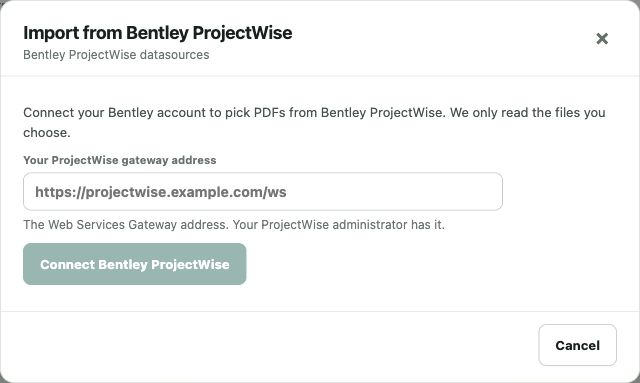
- Enter the Web Services Gateway address in the gateway field.
- Choose Connect Bentley ProjectWise and complete Bentley sign-in.
- Return to browse available datasources and folders.
The placeholder illustrates the shape of an address. Replace it with the actual value supplied by your administrator.
Select and verify the documents
Browse to the intended project folders and select the PDFs or DWGs for review. Identify the document issue and version you expect. After import, compare the resulting Groundbook list with the source register and resolve any missing or failed item.
For civil report review, include the current report and relevant plans. For resubmittal review, include the prior comments and returned package as references.
Keep review revisions explicit
The selected records are copied into the review package. A changed ProjectWise source does not automatically revise that package. Import the new issue for the next review and retain the baseline needed to understand changed requirements.
This guide covers document import. It does not promise universal gateway compatibility, continuous archive synchronization or finding writeback to ProjectWise. Verify the connection against the actual deployment and selected documents.
ProjectWise setup worksheet
| Check | Sources | Review question |
|---|---|---|
| Gateway address | Administrator-supplied Web Services Gateway URL | Is this the actual configured gateway rather than an ordinary project link? |
| Bentley account | Sign-in and intended datasource access | Does the account have access to the relevant datasource and documents? |
| Source package | Folders, document versions and drawing register | Do the selected files form the intended issue for review? |
| Import verification | Source document list and Groundbook package | Are the selected records present and later revisions explicitly identified? |
Resolve a connection question
Check the gateway address, network availability and Bentley account. Your administrator can confirm the datasource and gateway configuration. If a session expires, complete the picker’s reconnect process.
Groundbook steps and the setup screenshot were checked October 13, 2026. Describe the failing step when contacting support. A direct PDF/DWG upload can provide a review package while the connection setup is resolved.