
Show us the work.
Walk through a real task, the tools you use and the handoffs that slow your team down.
AI construction document review & QA/QC
Find conflicts and missing information across construction drawings, specifications, checklists, and code references. Groundbook links each finding to the exact source so your team can verify it before construction.
Upload PDF or DWG files
Choose files or drop them here
Pay per project
We've checked drawings from firms like



































Project owners include Fortune 500 hotel brand National restaurant chain United Nations agency and more
Checked projects on 6 continents North America South America Europe Asia Africa Oceania
Free 30-minute AI workflow consultation
For general contractors, engineering firms and architecture firms. Bring a workflow that takes too much time. An AI expert in AEC will help diagnose the bottleneck, identify improvements and work through a practical example with you.
Walk through a real task, the tools you use and the handoffs that slow your team down.
Identify where AI can reduce repetitive work, with clear inputs and a result your team can verify.
Work through a practical example and leave with a concrete next step for your firm.
Inside Groundbook
From PDF and DWG files to findings you can verify. Start for free in about 5 minutes.
Add PDF or DWG drawings and supporting PDFs. Choose which files to check and which to use as references.
Reviews typically take 20 minutes to 24 hours, depending on project size.
Bring PDF and DWG files from the tools you already use, and work with your projects from your AI assistant.
Use Groundbook in your AI assistantConnect through our MCP server
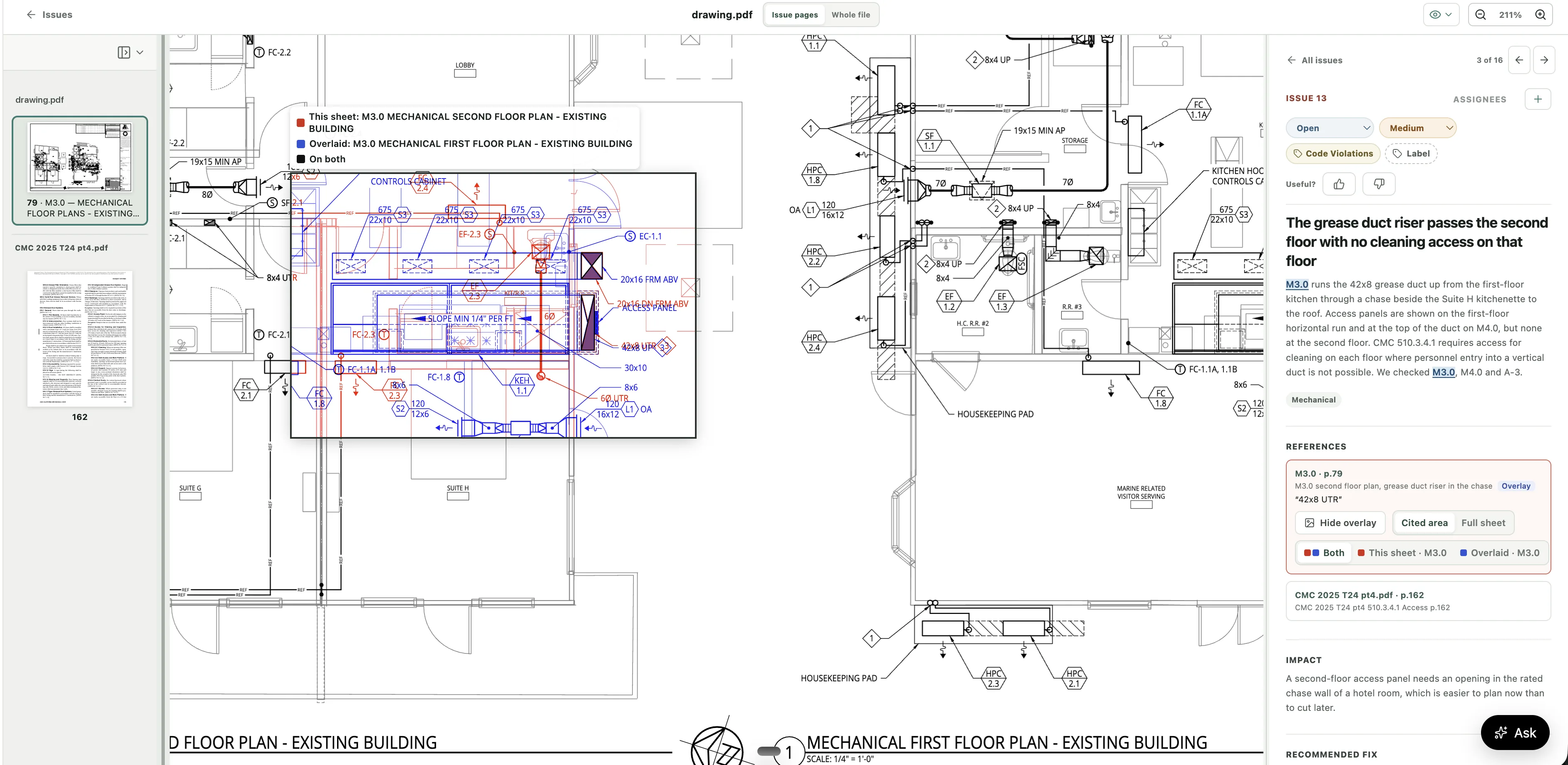
From a real project review
Examples of findings from a waterfront hotel and restaurant project.
Hotel entry doors were listed as unrated where the surrounding separation called for protected openings.
The team needed to reconcile the door rating before procurement.
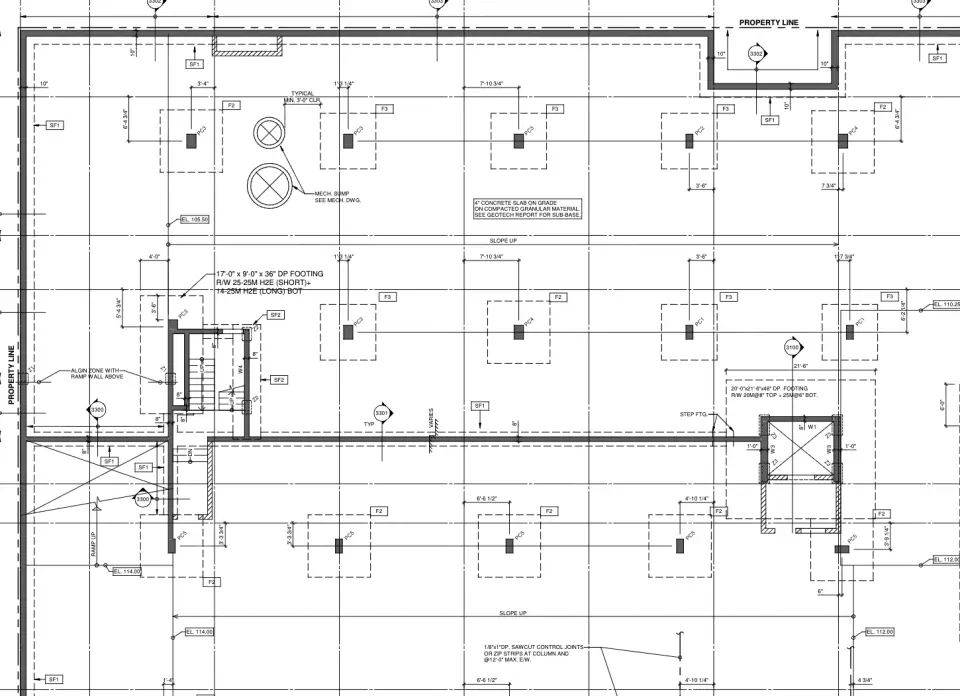
Structural details referred to architectural notes that specified a guard and handrail load below the adopted requirement.
The design criteria needed verification before detailing or fabrication.
A grease exhaust fan was shown on a wood platform without a documented clearance or noncombustible support condition.
The team needed to verify the support assembly and clearance.
Groundbook AI looks beyond a single sheet. It follows the relationships between disciplines and project requirements where costly issues often hide.
Compare architectural, structural, MEP, fire-protection, and civil documents for conflicts and missing coordination.
Examples: MEP ↔ STRUCTURE · ARCH ↔ MEPFind materials, ratings, dimensions, equipment, and requirements that disagree between the drawings and project manual.
Examples: RATINGS · MATERIALS · EQUIPMENTRun your own QA/QC, owner, lender, permit, or constructability checklist across the full document set.
Examples: QA/QC · OWNER STANDARDS · PERMITCheck the drawings against state and local codes and amendments, and cite each code section a finding relies on.
Examples: EGRESS · ACCESSIBILITY · FIRE SAFETYBuilt for your size
The same review at every size, and a different payoff at each one.
For sole practitioners and small studios with no QA/QC department
When the person who drew the set is also the one checking it, misses slip through. Groundbook is a second set of eyes on every sheet, so they surface before your client, the contractor, or plan check finds them.
A full cross-check of a set takes days by hand. Groundbook does the first pass in 20 minutes to 24 hours, and you keep the time for design and clients.
Monthly credit plans with no per-user fees. See the exact credits before starting your project.
For firms of a few dozen to a few hundred people, across offices
Your firm's QA/QC checklist runs on every project in every studio, so clients get the same standard of work whichever team drew the set.
Groundbook does the sheet-by-sheet search and sends each finding, with its source, to the project manager who owns it. Your most experienced people spend their review hours on decisions.
Coordination errors that leave the office come back as RFIs, change orders, and unbilled redesign. Catch them while they are still a markup, straight from the files in ACC, SharePoint, or Egnyte.
For Fortune 500 owners and national programs reviewing hundreds of sets a year
Prototype drift caught on paper costs a markup. Caught in the field, it costs a change order and sometimes an opening date. Every site set is checked against your current standards before permit and bid.
Review hundreds of sets a year with the team you have. Volume pricing, a dedicated support team, and an API, CLI, and custom integrations put findings into the systems you already run.
SSO and MFA, an audit trail, granular access, and on-prem or US hosting. Your data is never used to train models, so approval does not hold up the rollout.
For contractors
Nobody has time to double-check every count and every sheet before bid day. Groundbook AI reads the whole set and shows where it disagrees with itself, so the RFIs come up before you price the work, not on site.
Need quantities too? See how takeoff works
Examples of findings from a mechanical permit set for an apartment building.
The roof plan showed one fewer condenser of one size, and one more of another, than the indoor units on the floor plans called for.
The equipment order could not be confirmed until the unit assignments were resolved.
Ground-floor common rooms were served by ducted heat pumps with supply and return connections only. No outdoor air route or rate appeared in the set, which the mechanical code requires on the construction documents.
The ventilation ductwork and intakes could not be priced from the set.
The equipment detail showed refrigerant line insulation about half as thick as the specification's minimum.
Bidders and installers had two different thicknesses to price.
Coordinate design, preconstruction, and QA/QC across the people responsible for the set.
Check coordination across plans, schedules, details, and specifications before issuing the set.
Explore design-team reviews →Surface conflicting requirements, scope gaps between trades, and missing information during preconstruction.
Explore contractor reviews →Review project requirements and share findings with the teams responsible for resolution.
Explore owner reviews →Explore reviews for residential, commercial, healthcare, and infrastructure projects. Groundbook supports multilingual documents and teams worldwide.
In a free 30-minute call, an AI expert in architecture, engineering and construction reviews your current workflow with you, identifies opportunities for improvement and works through a practical example. Bring a task, document or process that takes too much time. The consultation is for general contractors, engineering firms and architecture firms. Book your free consultation.
An AI plan checker performs construction document review to surface possible conflicts, omissions, and compliance issues. Groundbook AI cross-checks drawings, specifications, checklists, and code documents and shows the source behind each finding.
We accept PDF and DWG files, including construction drawings, project specifications, reviewer or owner checklists, and building codes and local amendments. These can include architectural, structural, mechanical, electrical, plumbing, fire-protection, civil, and other project documents.
Yes. Groundbook AI is designed for every building type, from homes and ADUs to healthcare, education, commercial, industrial, infrastructure, and institutional projects.
Groundbook AI supports most countries and languages. The review logic is universal, so drawings, schedules, specifications, and reference documents are cross-checked the same way in any language, including English, Spanish, Portuguese, French, German, Italian, Dutch, Polish, Turkish, Russian, Arabic, Hebrew, Hindi, Chinese, Japanese, Korean, Vietnamese, Thai, and Indonesian, as well as less common languages such as Estonian, Icelandic, Georgian, Khmer, Amharic, and so on. The list is not exhaustive: if a language is not named here, chat with us and ask, or simply Start for free and test it. Mixed-language sets, local drawing conventions, and metric or imperial units are handled in the same review. For local requirements, upload the code or standard that governs your project and Groundbook compares the set against it.
Yes. We read the building codes and amendments that states, counties, and cities publish online, in a web browser, the way a human reviewer does, and we detect the codes your drawings cite. Model codes and standards that publishers own, such as the International Codes, NFPA, and ASME, are licensed; we use them only where a license allows it, and you can upload a copy you’re licensed to use. Each finding cites the section. We never copy or distribute code text. Uploaded codes stay private to your account. See how local code checks work.
Groundbook organizes the project set, follows references across documents, and returns structured findings with severity, impact, recommended action, and source locations. Your team can review the evidence behind each issue in one workflow. See the full comparison.
Project setup takes about 5 minutes without a sales call. Upload the project files, select the checks, review the exact price, and pay as you go. Reviews typically take 20 minutes to 24 hours, depending on project size.
Yes. When you set up a project, choose Takeoff under “I need” and pick your trades. Each item comes with its quantity and how we counted it, and every counted symbol is marked on the drawing so you can check it. See how takeoff works.
No. Groundbook AI supports qualified project teams by accelerating the first review pass and organizing possible issues. Final design, engineering, code, and construction decisions remain with the responsible professionals and authorities.
You or the original rights holders retain ownership of your documents and project data. Uploading files does not transfer intellectual property rights to us. We do not use your project data to train models, sell it to third parties, or make it available to other customers. Service providers may process it only on our behalf and may not use it for model training. Authorized personnel may review it for support, quality assurance, debugging, and internal evaluation. Read our data ownership and privacy commitments.
Let AI help you review plans to avoid costly rework and delays
Trusted by hundreds of professionals